
Create, manage and check Revit parameters
The Revit add-in for BIM coordinators and design offices: define parameters as property groups (property sets), apply them to the model as shared parameters with one click, coordinate them with the client via Excel and check completion before the IFC model is exported.
Open beta: free for everyone · closed beta: full feature set, 25 seats · compare editions
- Revit 2025
- Revit 2026
- Revit 2027
From parameter catalogue to verified IFC
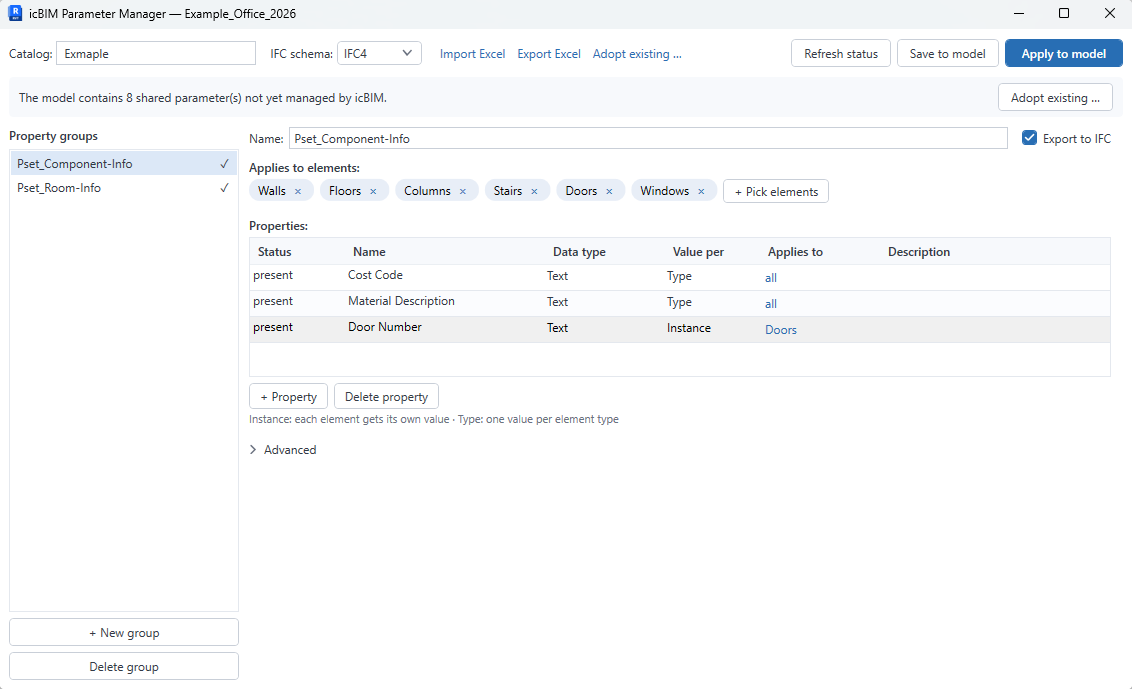
The Parameter Manager supports the complete attribution workflow right inside Revit: create, manage, coordinate, check and export parameters
Create property groups
Define and manage Revit parameters centrally as property groups (IFC property sets): name, data type, description, instance or type, element categories. “Applies to” restrictions make sure every property ends up only where it belongs.
Apply to your model
Apply catalogues to the Revit model with one click: the properties are created as shared parameters and bound to the right categories as project parameters, reproducibly and across projects. You never have to maintain a shared parameter file for this. If you need one anyway, for families or projects without the add-in, export it with one click, with the same GUIDs. Every change comes with a preview. Removing properties also takes effect in the model in a controlled way, with a confirmation instead of silent deletion.
Adopt existing parameters
Shared parameters already in the model, your office standards for instance, can be adopted into the catalogue via a dialog: with search, filter and an automatic group suggestion per set of element categories. The model stays untouched and all values are preserved. (also in the open beta)
Coordinate via Excel
Export the catalogue to Excel, coordinate it with the client and import it back: the EIR round trip keeps information requirements and model in sync. The Excel file also serves as a template to import the same properties into other projects. (import: closed beta)
Check completion
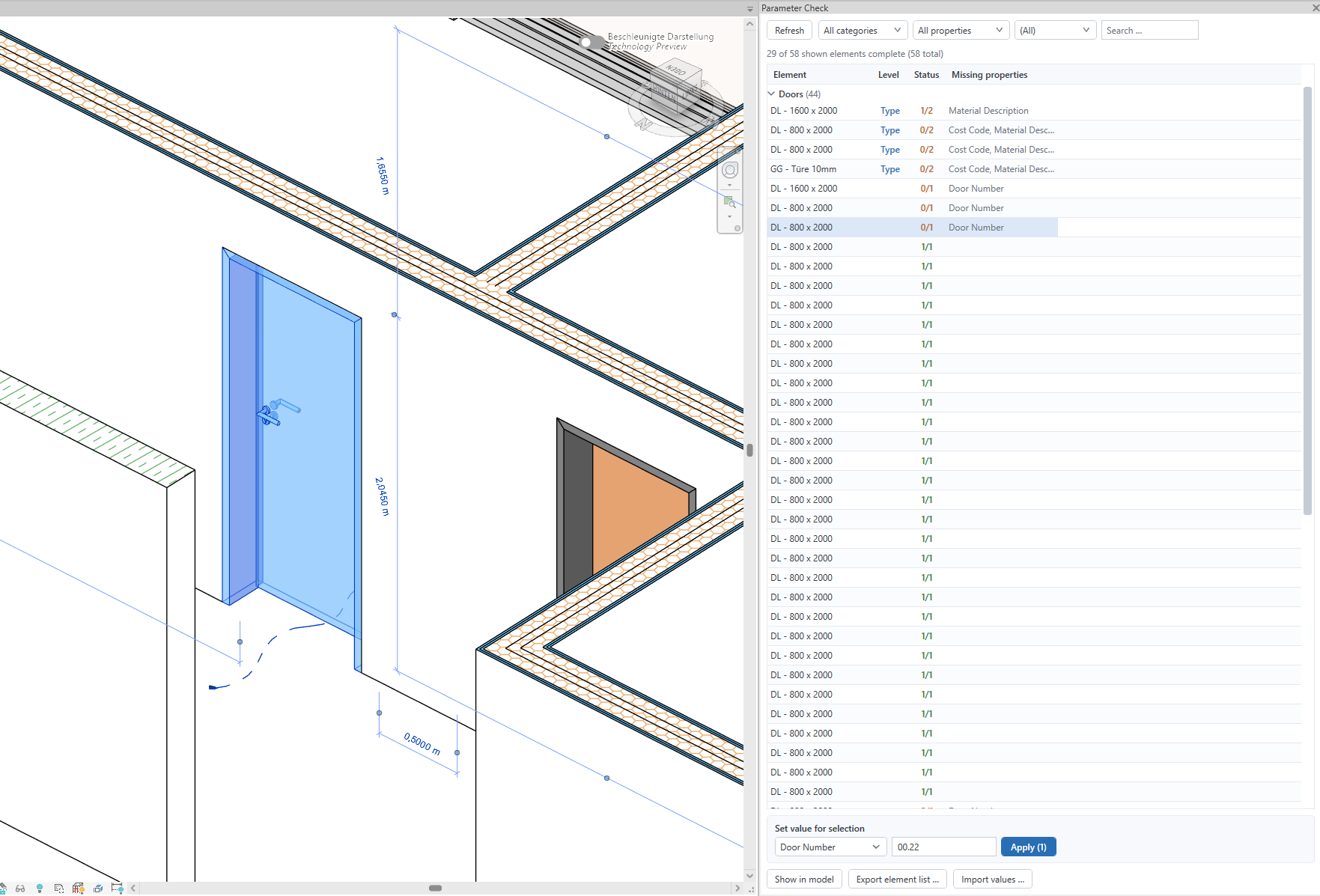
The “Parameter Check” panel shows fill levels per element and property, filters incomplete elements and supports bulk entry and the element list round trip via Excel. A single click selects the element in Revit, a double click zooms to it in the active view. (closed beta)
Export to IFC
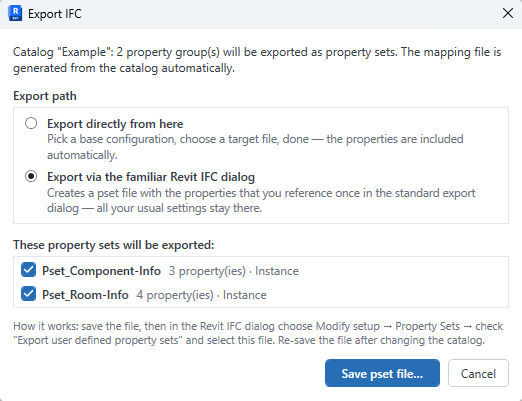
On IFC export the catalogue properties are written as clean property sets, for IFC 2x3 and IFC 4. The pset mapping is generated from the catalogue, no hand-written mapping file needed. Your information requirements arrive well-structured in the openBIM format. (also in the open beta)
One account for everything
The Parameter Manager uses your icBIM account, the same account as the icBIM Viewer. Register once, use both.
Creating Revit parameters: by hand or with the Parameter Manager
Revit ships everything you need to create parameters. The effort lies in the repetition: per parameter, per category, per project
Creating parameters in Revit that should end up in the IFC later takes two steps. First you create a shared parameter: in an external parameter file, with group, name, discipline and data type. Only on that basis do you create a project parameter via Manage → Project Parameters → Add, which binds the shared parameter to categories. A plain project parameter without this foundation exists only in the current project, cannot be used in tags and has no GUID that other projects or an IFC export could recognise it by. For information requirements from an EIR or BEP, shared parameters are therefore the standard.
For a handful of parameters the Revit dialog is fine. Once dozens of properties have to be created for several categories, coordinated with the client and repeated in every project, it becomes error-prone. The icBIM Parameter Manager takes exactly this repetition off your hands: describe the properties once in the catalogue and apply them to the model with one click.
In Revit by hand
Parameter file, group, parameter, project parameter, categories. Then fill in values by hand, build a schedule or write the export table for the property sets, export. Anything missing only shows up later.
With the Parameter Manager
All properties of a group live in the catalogue. Apply creates the shared parameters and binds them to the categories.
What the add-in does not do: family parameters in the family editor, global parameters and project parameters without a GUID. It works at project level with shared parameters, because only those make it into IFC cleanly. For families, export the shared parameter file from the catalogue and load it in the family editor.
Open beta & closed beta compared
The open beta is fully usable on its own, the closed beta adds the coordination round trip and the Parameter Check
| Feature | Open beta | Closed beta |
|---|---|---|
| Create, manage and apply property groups to your model (with preview) | ✓ | ✓ |
| Adopt existing shared parameters from the model | ✓ | ✓ |
| “Applies to” restrictions, catalogue info | ✓ | ✓ |
| IFC export with catalogue-based property sets | ✓ | ✓ |
| Excel export of the catalogue | ✓ | ✓ |
| Export shared parameter file (same GUIDs, for families and projects without the add-in) | ✓ | ✓ |
| Excel import of the catalogue (EIR coordination round trip) | — | ✓ |
| “Parameter Check” panel (fill levels, filters, bulk entry, element list round trip) | — | ✓ |
The closed beta is limited to 25 seats and free of charge for the entire beta phase. Access ends when the beta ends. Go to the closed beta: claim a seat →
Up and running in three steps
From download to your first property group in minutes
Create an account
Set up a free icBIM account, the same account as for the Viewer
Install
Download and run the installer, Revit picks the matching version automatically
Get started
Sign in inside Revit, create your first property group and apply it to the model
Download
Free for every icBIM account, registration takes a minute
icBIM Parameter Manager for Revit
- Windows
- Revit 2025
- Revit 2026
- Revit 2027
To download, sign in with your icBIM account, the same account you use for the Viewer. No account yet? Registration is free.
Sign in & download →Note: the installer is not code-signed yet, so Windows SmartScreen may show a warning on first launch. Choose “More info” → “Run anyway” to continue. A signature will follow before the official release. Installation is per user and requires no admin rights. Revit picks the matching version automatically. Use of the software is governed by the terms of use (German).
Frequently asked questions
How do I create parameters in Revit?
In Revit you create parameters via Manage → Project Parameters → Add: name, discipline, data type, grouping, instance or type and the categories the parameter should apply to. If the parameter has to work in tags, in schedules across several categories and in the IFC export, it must be a shared parameter from a shared parameter file. For a few parameters that is fine. With dozens of properties for several categories and projects it becomes tedious. That is exactly what the Parameter Manager is for: describe the properties once in the catalogue and apply them to the model with one click.
What is the difference between project parameters and shared parameters?
Project parameters exist only in the project they were created in. They cannot be used in tags and have no unique identifier that other projects or an IFC export could rely on. Shared parameters are defined in an external file with a GUID and are bound to categories in the project as project parameters. That makes them work in tags, in multi-category schedules and in the IFC export. The Parameter Manager creates shared parameters only and binds them as project parameters. It generates the parameter file in the background, your own shared parameter file stays untouched.
Can I create many Revit parameters at once?
Yes. In the Parameter Manager you group any number of properties into property groups, set the element categories and instance or type per group and apply everything to the model with one click. A preview shows beforehand what will be created, extended or flagged as a conflict. If you prefer to prepare the list in Excel, export the catalogue template, fill it in and import it back (Excel import in the closed beta).
What does the Parameter Manager cost?
Nothing during the beta phase. The open beta is free for every icBIM account and its features remain available unchanged after the beta. The closed beta with Excel import and Parameter Check is free as well, limited to 25 seats and ends with the beta phase.
Which Revit versions are supported?
Revit 2025, 2026 and 2027 on Windows. One installer covers all three versions, installation is per user and requires no admin rights. The add-in works at project level, in the family editor the icBIM tab is hidden automatically. It does not manage family parameters or global parameters. For families, export the shared parameter file from the catalogue, the properties keep their GUIDs.
Do I need a separate account for the add-in?
No. The Parameter Manager uses your icBIM account, the same account as the icBIM Viewer. If you are already registered there, simply sign in to the add-in with the same credentials.
Does the add-in work without an internet connection?
Yes. After signing in, the licence server issues an offline licence valid for 14 days, plus a 3-day grace period. As long as you work with an internet connection once within that period, the licence renews silently in the background. Your model data always stays fully local.
On how many machines can I use the add-in?
Your account can be signed in on 2 devices at the same time, for example workstation and laptop. When signing in on a third device you can release an existing device right inside the add-in. You can also do this at any time in your account area.
How do I get the full feature set?
Through the closed beta: 25 seats, completely free, no payment details. Access ends with the beta phase, after which the open beta remains fully available.
Can I rename properties later on?
Not once they have been applied to the model, because Revit cannot rename bound shared parameters, not even via its API. The add-in does not hide this: if the name in the model differs from the catalogue, it shows the status “name differs” and recommends creating the property anew. The same applies to the Excel import: a property that is already applied and was renamed in Excel keeps the name from the model in the catalogue, and the import message lists those rows. Properties that have not been applied yet can be renamed freely in the catalogue.
Is the add-in available in English?
Yes, fully. By default the add-in follows the language of your Revit installation. You can also fix the language in the settings. The interface, the “Parameter Check” panel and the Excel files (catalogue and element list) are consistently bilingual (English/German), and the Excel import reads both languages, so files survive a language switch.
Try it now
Download the icBIM Parameter Manager and create your Revit parameters as structured property groups, or claim one of the 25 closed-beta seats for the full feature set right away.
Go to download → Closed beta: claim a seat